Overview
Aktivate is a B2B and B2C scholastic sports management platform serving K–12 schools across the country. Athletic directors use it to manage registration, compliance, and team communication. When I joined, the web application was functional and active but overdue for a rebrand. A greenfield mobile communication app was also on the roadmap, with plans to expand the platform into partnerships and fundraising.
From the start, there was a tension between what discovery surfaced and what the business wanted to build. Research identified critical needs for a potential mobile app early — Spanish language support, emergency contact access, compliance safeguards, and parents' preference for easier mobile registration. But the founding team's core vision and business interest was the communication app, and that had to ship first.
As the platform expanded, earlier research findings became harder to defer, moving up in priority one release cycle at a time.

Impact
Research identified the most critical needs early, but these needs didn't ship until the third, fourth, or fifth release cycle. These needs were known, but they weren't yet the first priority. Each one moved up when real-world feedback made deferring it untenable.
The outcome wasn't a metric, it was a clearer understanding of what happens when business priorities and user needs get out of sync.
The core mismatch of parents wanting efficient mobile registration and account capabilities over just a communication tool meant that adoption was slow. The app grew from 30 teams at beta to 300+ after one year, and reached 1,000+ total users within two years.
Connect Mobile App GROWTH:
30 to 300+
teams and clubs using the app after one year
1,000+
Users across coaches, students, and parents after two years
As the platform expanded, earlier research findings became harder to defer, moving up in priority one release cycle at a time.
Process
Research was continuous, not front-loaded. I conducted interviews, usability tests, discovery sessions, and stakeholder workshops with athletic directors, administrators, coaches, and parents throughout the project. Analytics were added once instrumentation was in place.
Web App Rebrand The web app redesign was driven by a company-wide rebranding initiative. I built a complete brand system — color, typography, components, marketing website — and applied it across the platform, managing external vendors throughout.
Alongside the rebrand, user research and heuristic review revealed significant friction in the registration workflow. Parents had no confirmation screen or progress indicators after submitting registration. They contacted customer support, coaches, and athletic directors directly to check their status, creating overhead across the organization.
I added a confirmation screen and a checklist of completed and pending steps, giving parents and admins real-time visibility and reducing the need to chase status updates through other channels. Additional improvements addressed missing next-step guidance and absent confirmation states throughout the flow. A/B testing on layout and copy variations across the marketing site and fundraising pages validated decisions post-launch.
Aktivate Connect — Mobile App Aktivate Connect was a net-new mobile communication app. I owned all UX/UI design from early wireframes through five release cycles, with each iteration informed by feedback from an expanding base of schools and teams.
Beta: Core team communication — group chat, a dedicated student/athlete channel, and a guardian channel. Launched to an initial group of schools to gather real usage data before expanding.
Post-beta: Announcement channel for coaches, direct messaging, push and email notifications, Spanish language support. Research had flagged these early, but beta data and expanding school feedback finally gave them the priority they needed.
Later cycles: Team directory, content flagging, emergency contacts tied to athlete profiles, and an AD-level view for pulling communication logs for compliance. These were driven by real situations that emerged in the field, not just upfront research.
Scope & Constraints

Key Findings and What Changed
These findings were identified as major obstacles throughout the mobile app build process and were addressed accordingly.
Parents wouldn't check the app without prompting
Without a notification, parents said they'd forget the app existed. Some responded to email more reliably than push notifications.
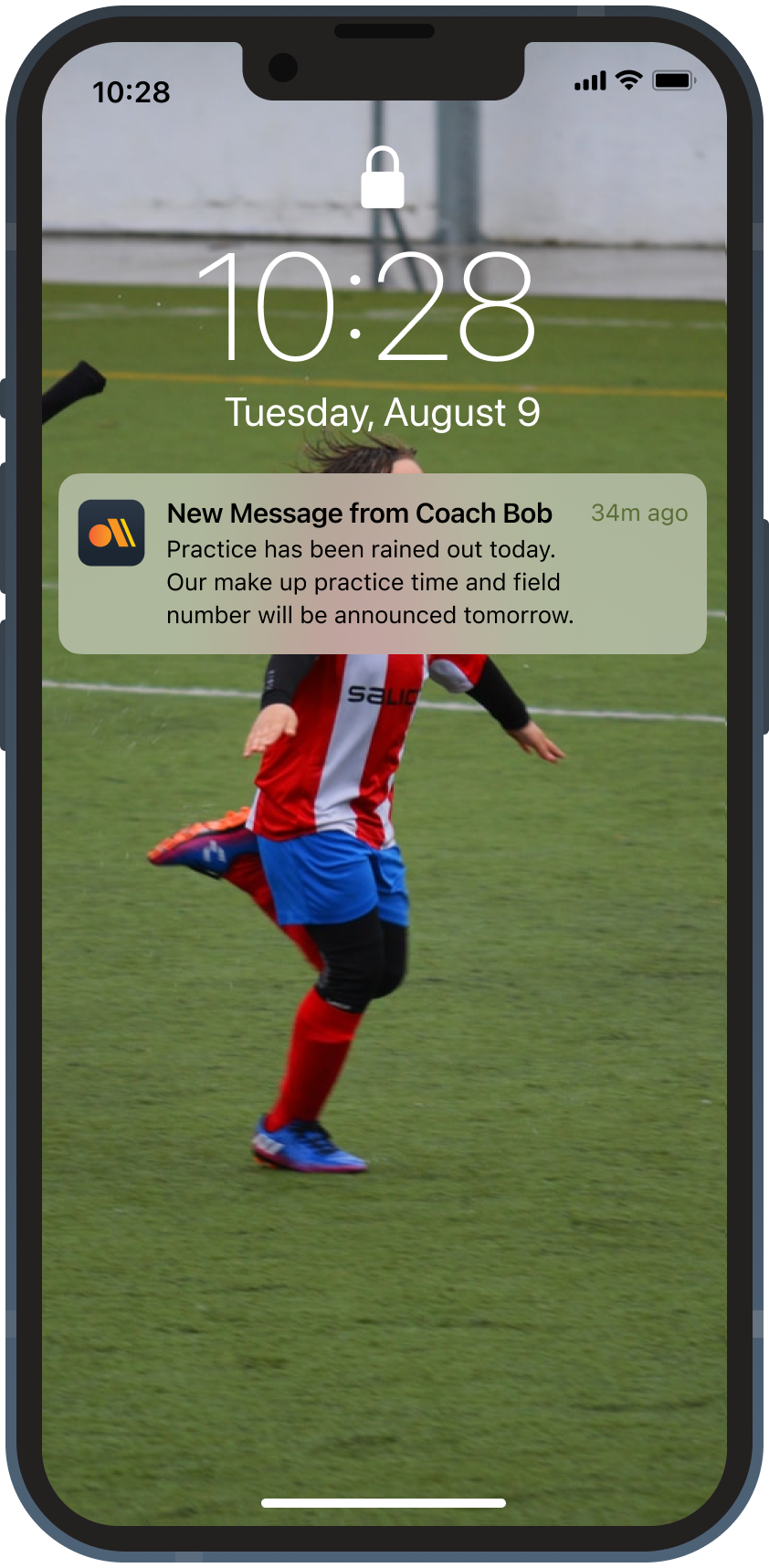
Both push and email notifications were prioritized on the roadmap to keep teams engaged.
Spanish language support was non-negotiable.
The scale of the need wasn't fully apparent until post-beta expansion. Many schools had large Spanish-speaking populations for whom the app was immediately inaccessible.

Auto-translation was implemented based on the user's phone presets, with the ability to add additional languages in the future languages.
Registration Status
Before sports could hold tryouts or build a team, students needed to be properly registered to play. Coaches have to chase students down and check the desktop platform to see who is eligible.

In-app registration status with real-time updates allows coaching staff to see who is eligible for tryouts and to be placed on a team.
Coaches needed to broadcast without noise.
Coaches needed to post announcements and reminders without students and parents replying back and burying the posts.

A one-to-many announcement channel was implemented to address this need.
Multi-audience stakeholder communication carried compliance risk.
Peer bullying and inappropriate communication between adults-to-minors became more urgent to address after real situations emerged during beta.

Tiered coaching permissions, content flagging, and Athletic Director-level communication logs were added.
Emergency contacts were a safety gap.
Coaching staff needed immediate access to a guardian contact for each athlete during games or practice emergencies.

Emergency contacts were tied to each athlete's profile and linked to their verified guardian.

Designing a Scholastic Sports Management Platform Across Competing Stakeholder Needs
As the sole designer on a two-product team, I owned end-to-end design for a K–12 sports management platform—including a full web app rebrand and a greenfield mobile app—while navigating the gap between what research surfaced and what the business was positioned to build.
Project Details
Client
Aktivate
Team
Myself; engineering team of six; offshore frontend vendors
Role
Sole Product Designer, Interim PM
Methodology
Product Discovery (Stakeholder interviews, Affinity-diagramming, Journey Mapping), Branding, UX/UI Design, Usability testing
Timeline
2021-2023
Learnings
The most significant learning from the beta wasn't about a feature — it was about positioning. Parents already had communication tools they used across all of their children's activities. What they actually wanted was an easier way to register their student athletes and monitor progress on mobile. The web application wasn't yet equipped to offer that.
When the communication app launched without that capability, parent expectations didn't match what they found. The mismatch generated support feedback and contributed to early adoption challenges.
The finding didn't immediately change feature direction — resources and priorities were already committed — but it reinforced that marketing promises and product reality need to be in tighter alignment from the start. That gap is what the next phase of the platform was pointed toward closing.
For future projects, I would push harder earlier to align the go-to-market message with what the product can actually deliver at launch — even when the roadmap is optimistic.
There were six steps in the process of developing and testing this product.
1. Review Ten Year Development Plan
A development plan was released in October 2020 detailing improvements in all areas of the transportation system over the next 10 years. I reviewed this for insights into CAT’s goals and ideas for what to focus on in the research.
CAT has technology goals outlined in section 7.2.7 Technology Trends that aligned with my research and I was able to validate some of their goals.
2. Gather Stakeholder Insights
I interviewed CAT marketing, operations, planners and the director of operations to get an idea of where they were focusing efforts for the app and what they had discovered so far about the app usage.
CAT provided their route data as well as Masabi’s app data, which included stops and number of tickets used at stops over a 3 month period. This steered the research locations and times to reach the most riders, and specifically riders who used the app.
3. Analyze Existing Rider Feedback
Check social media feedback, as well as customer service and in-app survey feedback for insights into pain points and concerns.
CAT has a Facebook and Instagram account that is not very active, however there were some good questions that were raised when the app was first released that were important to keep in mind throughout the test. The in-app survey feedback also had some thoughtful comments for the study.


4. Write Field Interview Script and Design Paper Surveys
Questions were chosen to get an idea of barriers for non-app users and pain points and satisfaction for app users. The questions were the same for in-person interviews and paper surveys.
A filtering question was asked first, “Do you use the phone app to buy your bus ticket?”
-
Based on answers, non-app users were asked two questions:
-
Does the phone app sound like something you would like to use? Why or why not?
-
Is there anything that would prevent you from using the phone app?
-
-
For app users, there were three questions:
-
How disappointed would you be if you could no longer use the phone app?
(Not at all Disappointed, Somewhat Disappointed, Very Disappointed)-
Please explain why you answered that way.
-
-
If you had a magic wand, what would you change about the phone app?
-
How satisfied are you with the phone app?
(Unsatisfied, Kind of Unsatisfied, Neutral, Kind of Satisfied, Satisfied)-
Please explain why you answered that way.
-
-

Paper Surveys in English (left) and Spanish (right)
5. Observe riders, Conduct Interviews, Administer Paper Surveys
Observations were performed of riders purchasing tickets and using different fare payment methods onboard. Paper surveys were handed out onboard and collected soon after. Interviews were performed at the Government transfer station and onboard various routes.
-
Observations were made of riders purchasing tickets from the customer service desk and onboard buses. As well as using existing ticketing methods such as cash, pass cards and the rideCAT mobile app.
-
Paper surveys in English and Spanish were distributed on busy routes to get as much data as possible.
-
Field interviews were performed at the Government Transfer Station and on various routes.

26 App Users
(20 in-person interviews,
6 paper surveys)
56 Non-App Users
(18 in-person interviews,
38 paper surveys)
16 Bus Drivers
across various routes
and times6. Synthesize data, compile a report and presentation
A report was presented to stakeholders of findings from the study and recommendations on how to address issues.
-
Gauge user satisfaction and uncover pain points of app users. Users were generally satisfied with the rideCAT app. They said that it was easy and convenient to use, however there were pain points. App users pain points can be broken down into 2 categories, User Experience and Technical. There is some overlap between the categories when it comes to getting real-time service alerts and accurate route times.They described this as a priority and wish that this information and the fare app was combined into a single app.
I prefer a physical card because I’m afraid of online scams
Nothing keeping me from using it, except would want to be able to put a few dollars in and not a whole $20.
The money doesn’t go in the farebox all of the time, and [I] hate to hold up the line of people waiting to board the bus.
When the farebox gets jammed, it’s not safe...especially in Immokalee, there is no supervisor out there to fix it, so you end up holding cash the whole time—it’s not safe!
Other user experience issues were not critical to the function of the app, such as a request for fewer screens to click through to get to the ticket, or having a longer window of time to purchase a single fare ticket. CAT will have to coordinate with Masabi to implement feature upgrades.
Technical problems were the bulk of pain points for app users. Riders mentioned the app freezing when they are trying to use it, or the validator not scanning. One rider mentioned having to restart the app after it glitched when he moved between apps on his phone. And as I mentioned before, service alerts were not updating, which caused a lot of frustration for app users.
-
Discover barriers for riders not currently using the app. For Non-App users some of the obstacles were a lack of awareness of the app and assumptions about the specifics of the app. Some people I talked to didn’t know if they could use special fare passes on the app, like reduced fare tickets or if they could buy single fares.
Circumstantial barriers like not having a bank account or credit or debit cards can keep people from using the app. Insufficient devices such as using a non-smartphone, or currently using a smartphone that doesn’t support new apps, or a phone that doesn’t have enough memory or battery life present obstacles to app usage.
Behaviors and beliefs include riders who don’t use a cellphone at all, or who don’t use the bus often, and riders who are distrustful of digital devices for fear of scams, or they just prefer physical cards.
-
Assess how the app is performing in relation to stakeholders goals. All 16 drivers I spoke with liked the app. They said riders rarely had any issues and never asked for help. Compared to the farebox, where the driver has to intervene often when cash gets jammed and paper tickets won’t swipe. All of the operators were frustrated with these farebox malfunctions and some expressed that it put them in unsafe positions, one example being holding cash on their route. They also mentioned that it took up time from their route to troubleshoot those issues.
Drivers said that they didn’t know much about the app and when some non-app riders asked them about it, all they could do was direct them to the app store. They had no information to share with riders.
-